SOLIDitech
SOLID is an end-to-end Internet Service Provider (ISP) automation platform used by some of the best ISPs in South Africa. SOLID provides online sales, RADIUS services, fulfilment workflows, automated invoicing & collections and customer management – all in a single platform.
SOLID enables ISPs to instantly sell Fibre, Wireless and Support Services whilst eliminating manual bottlenecks, fast-tracking the sales-to-collections cycle. SOLID is fully integrated with Netcash’s debit order, credit card processing and Pay Now services. This means that with SOLID, you capture the order once and the integrated workflow engine ensures successful order fulfilment, service provisioning, invoicing and collection.
Netcash Service Key Activation
Once you’ve created an account with Netcash, the first thing you will need to do to integrate with SOLID, is activate the Netcash service keys.
Netcash provides a set of service keys that are specific to your merchant account that will be used by SOLID to interact with the Netcash APIs.
Three Netcash service keys are required
- Account service
- Debit orders
- Pay Now
Each key needs to be enabled on Netcash and then configured in SOLID
In your Netcash account Navigate to Netcash> Account Profile > Netconnector
Account service key:
This service key is used to validate bank account information that you capture against customer accounts, as well as pull statements from Netcash for reconciliation purposes.
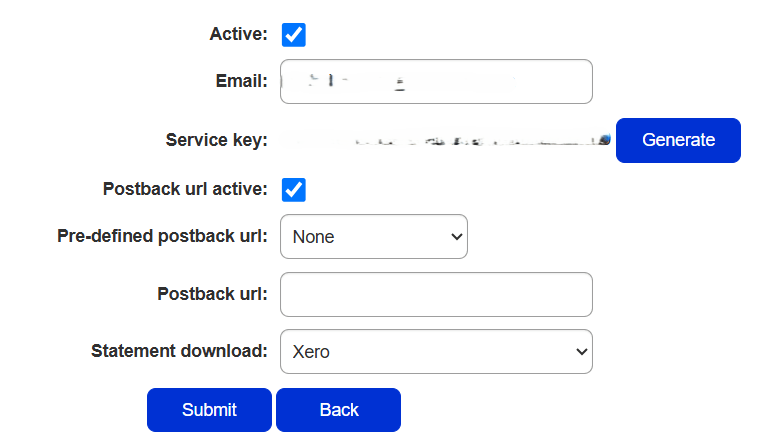
Navigate to Netcash> Account Profile > Netconnector> Account service
- Tick the active box.
- Insert an email address to receive notifications.
- Tick the postback URL active box if your software requires a postback URL.
- Select the statement download format if your software appears in the dropdown – or
- Insert the postback URL where the statement should be electronically sent.
- Click on the Submit button.
- The service key is generated and emailed to the email address linked to the service key.
Debit Order service key:
The debit orders key is used in SOLID to submit debit order batches to Netcash.
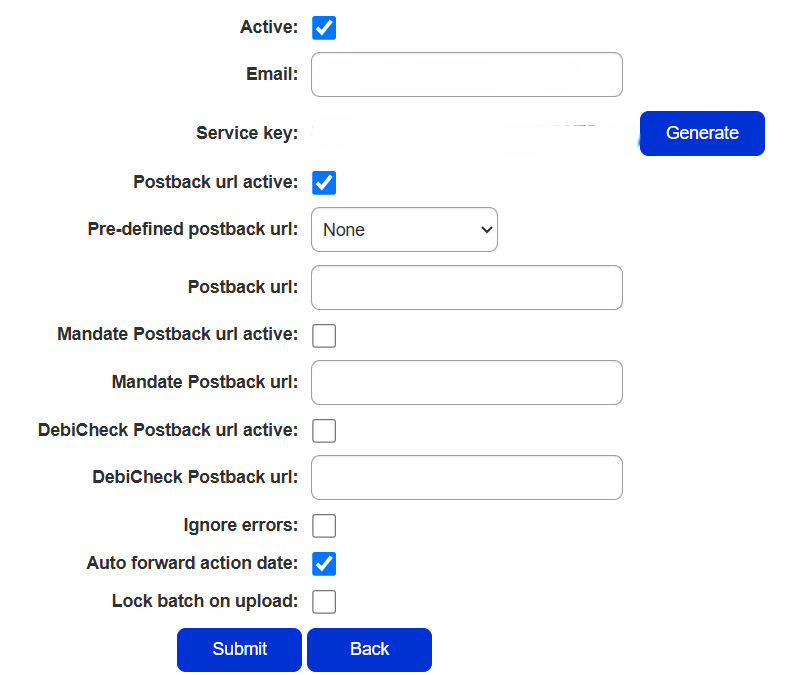
Navigate to Netcash> Account Profile > Netconnector> Debit Orders
- Click on Account profile.
- Click on NetConnector > Debit orders
- Complete the required fields.
- Tick the postback URL active box if required.
- Select the pre-defined postback URL if your software appears in the dropdown list – or
- Insert the postback URL where the responses should be electronically sent.
- Choose from the following options: Ignore errors, Auto forward action date, or Lock batch on upload. (See notes below for details).
- Click on the Submit button.
- The service key is generated and emailed to the email address linked to the service key
Note: Please ensure that “Ignore errors” is unchecked, “Auto forward action date” is checked and “Lock batch on upload” is unchecked as below when activating this key.
Pay Now Service key
The Pay Now service key is used by SOLID to integrate the SOLID customer portal with the Netcash PayNow service, allowing customers to settle balances directly from their self-service portal.
Navigate to Netcash> Account Profile > Netconnector> Pay Now
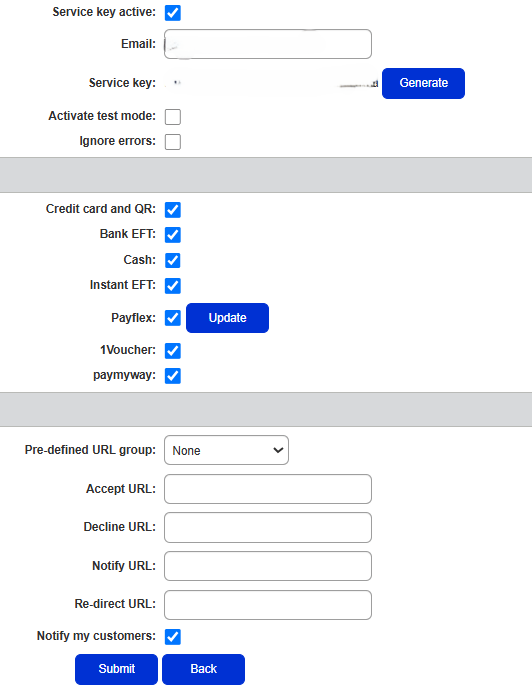
Under the “Service key” section, ensure that the “Activate test mode” and “Ignore errors” checkboxes are unchecked as below.
Under the “Payments accepted” section, it is up to you which configuration you support.
Under the “Payment notifications” section, you will need to configure the URLs for your specific SOLIDinstance. In the example below, the SOLID instance is running at https://cloud5.soliditech.com/ . Your SOLID instance is likely to be something likehttps://<mycompanyname>.soliditech.com, where <my_company_name> will be replaced with a lower case version of your company name without spaces. The URLs for the notifications will need to be in the following format (remember to replace <mycompanyname> with your company specific URL name): (https://cloud5.soliditech.com/)
Accept URL: https://<mycompanyname>.soliditech.com/isp/rest/api/netcash/accept
Decline URL: https://<mycompanyname>.soliditech.com/isp/rest/api/netcash/decline
Notify URL: https://<mycompanyname>.soliditech.com/isp/rest/api/netcash/notify
Re-direct URL: https://<mycompanyname>.soliditech.com/isp/rest/api/netcash/redirect
Note: The “Pre-defined URL group” select box should stay on “None” and the “Notify my customers” checkbox should remain unchecked as below.
- Select the Service key active box.
- Insert the email address to which you would like reports and notifications to be sent.
- Select Activate test mode if you wish to test credit cards only (no transactions will be processed in test mode).
- Select one of the below payment methods to activate on your Payment Gateway.

Note: Credit card payments
Netcash accepts Visa and Mastercard by default. American Express and Diners Club International are available on request, as these cards incur additional fees. To find out more about the fees or to activate American Express and or Diners Club international please contact your Account Manager.
Configure Netcash Service Keys on SOLID
Once each key listed above has been enabled on the Netcash Merchant portal, you then need to configure the keys on SOLID.
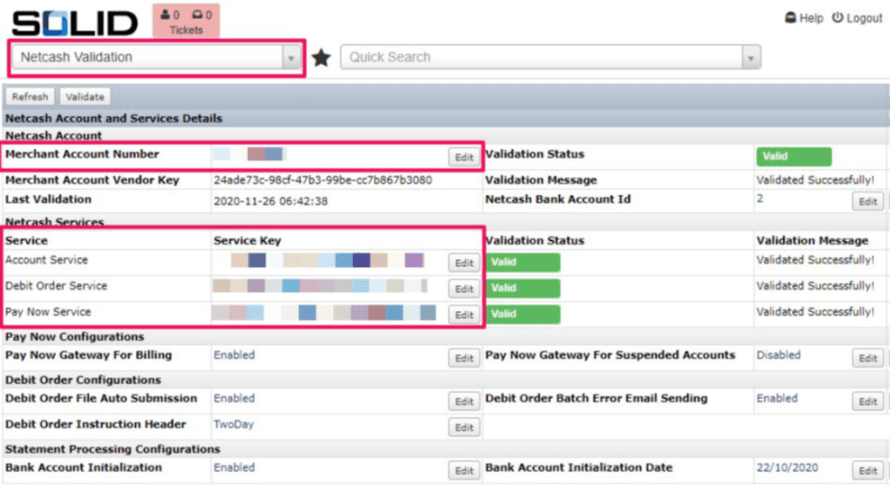
To do this, you can use the Netcash Validation module.
The Netcash Validation Module
Navigate to the Netcash Validation module by using the Quick Module Access bar.
The key bits of information you’ll need are your merchant account number (This number can be found top right-hand corner in your Netcash account) and your account, debit order and pay now service keys.
Click the Edit buttons to capture your configuration.
Access Required
To configure Netcash: Module ID 51114: Netcash Validation
To load other Netcash keys and enable Netcash functionality on SOLID: Module ID 7: System Config
Copy and paste your Netcash account number and service keys.
SOLID and Netcash Integration
The SOLID platform integrates with Netcash in four functional areas, namely:
- Debit order detail validation
- Debit order submission
- Pay Now integration
- Statement processing and reconciliation
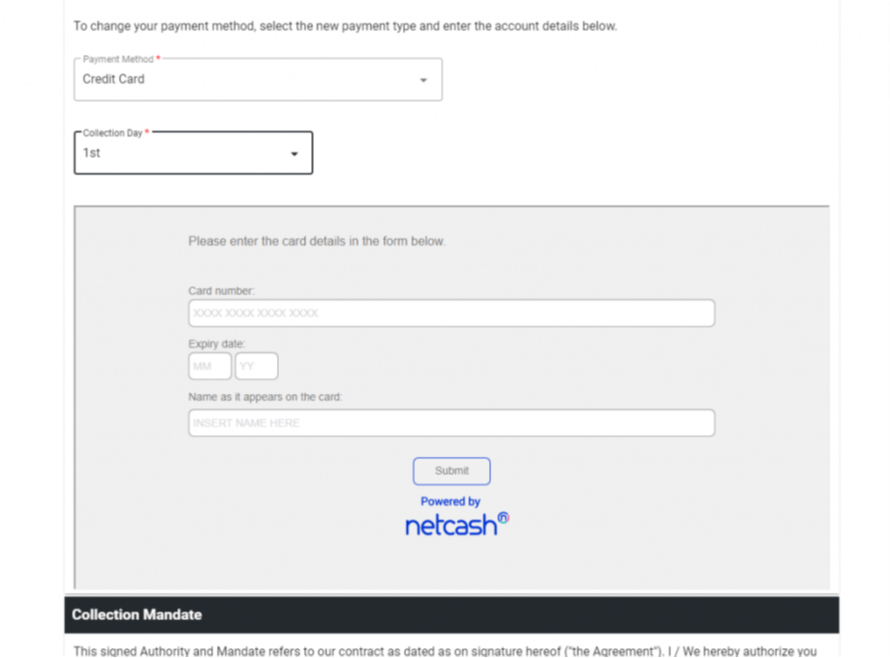
- Credit card payment detail capture
Debit Order Detail Validation
- This function requires the “Account service” key to be configured.
- Additionally, the debit order validator will need to be configured to use the Netcash validator.
- To configure:
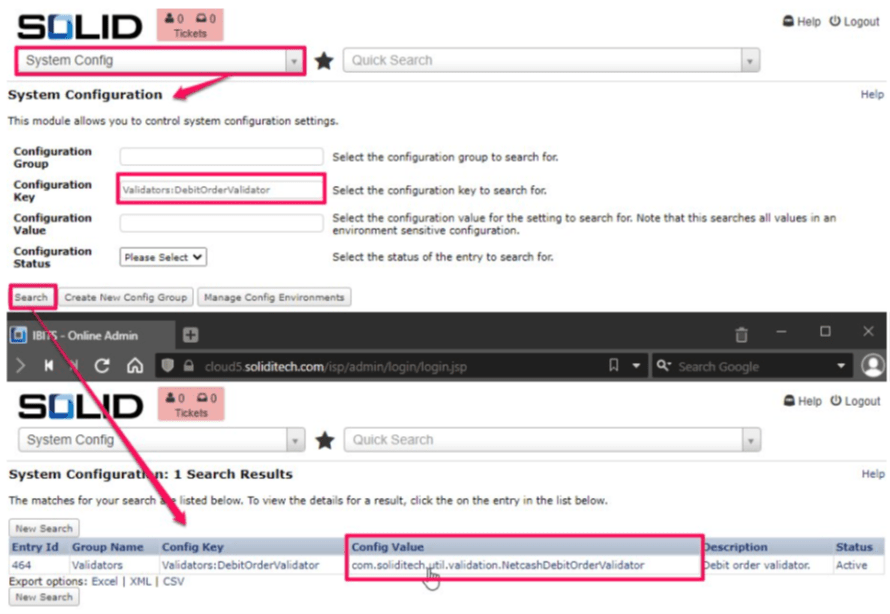
- Go to System Config module
- Search for the Validators: DebitOrderValidator config key
- Click on the config
- Set the value to com.soliditech.util.validation.NetcashDebitOrderValidator
- Update
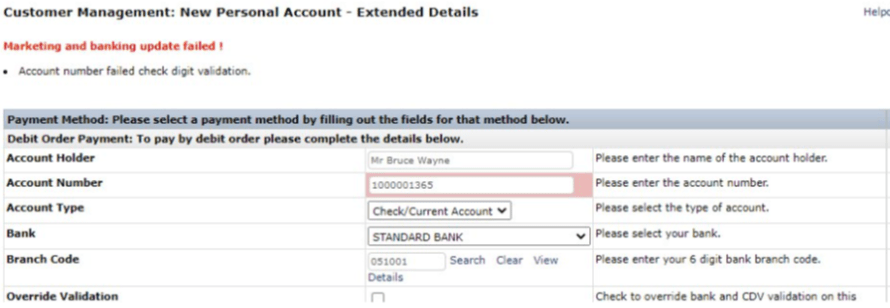
This means you get fast accurate verification of the validity of the debit order details captured, whether by your internal account administrators
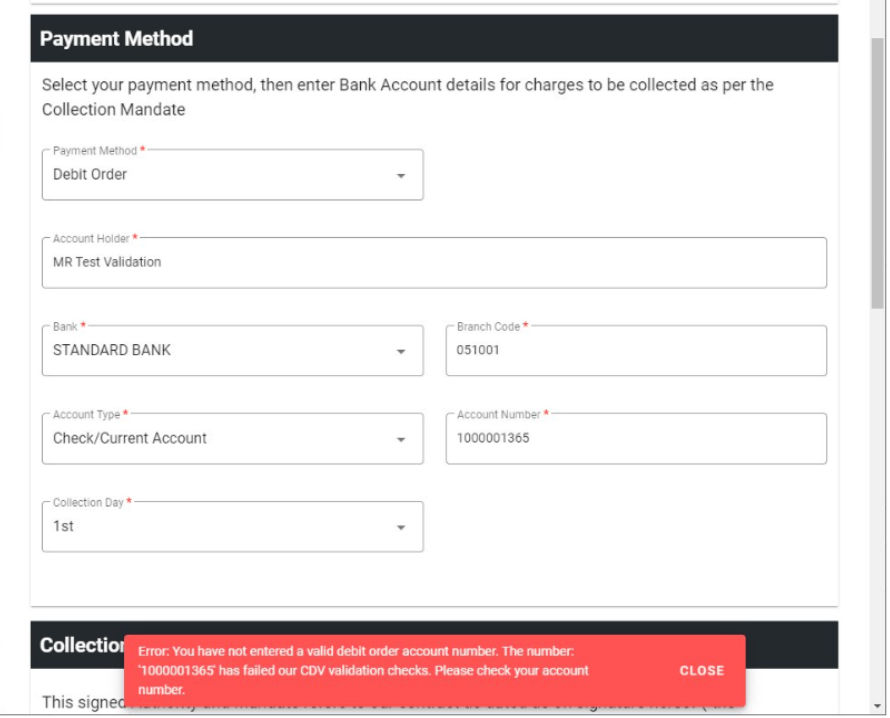
Or your customers:
Debit Order Submission
While this function makes use of the Netcash “Debit orders” key, it should preferably be used in conjunction with the debit order validation and statement processing and reconciliation functions, making it indirectly dependent on the “Account service” key as well.
SOLID has a module for debit order batch creation called “Create EFT File”. Select Eft Format of “NetCash” and Organisation Bank Account of “NETCASH BANK” for automated debit order submission
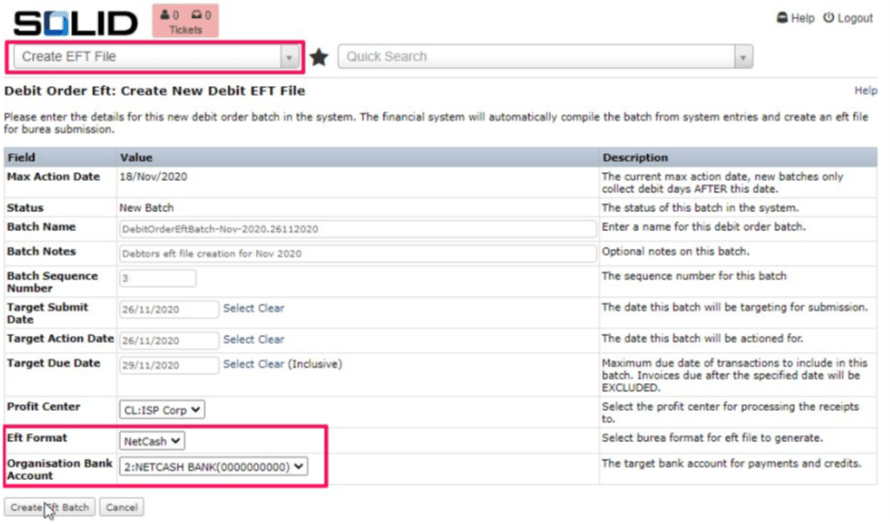
Review the batch created and submit to Netcash
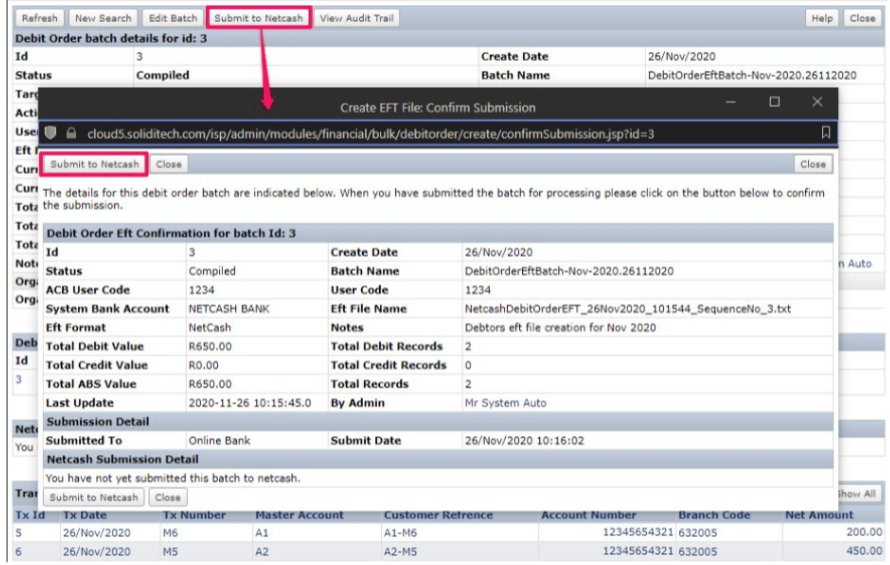
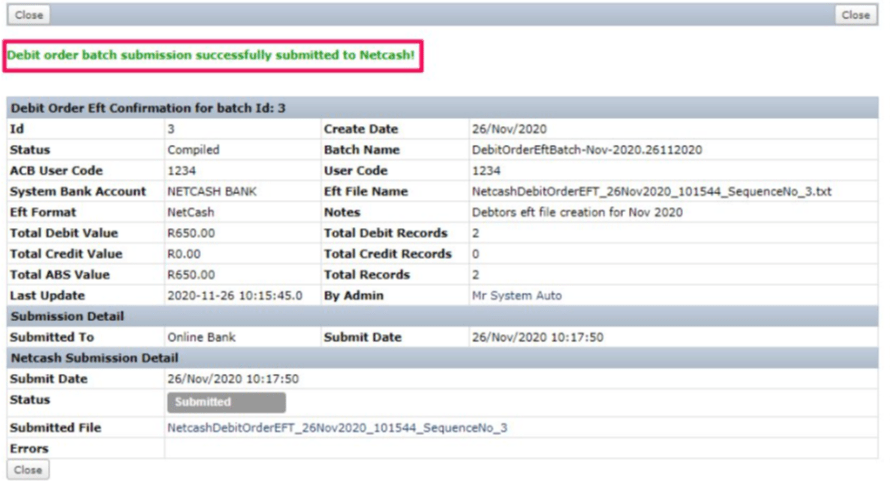
The batch will be in a status of submitted until either the batch is rejected by Netcash, in which case you will receive an error notification, or the batch is accepted.
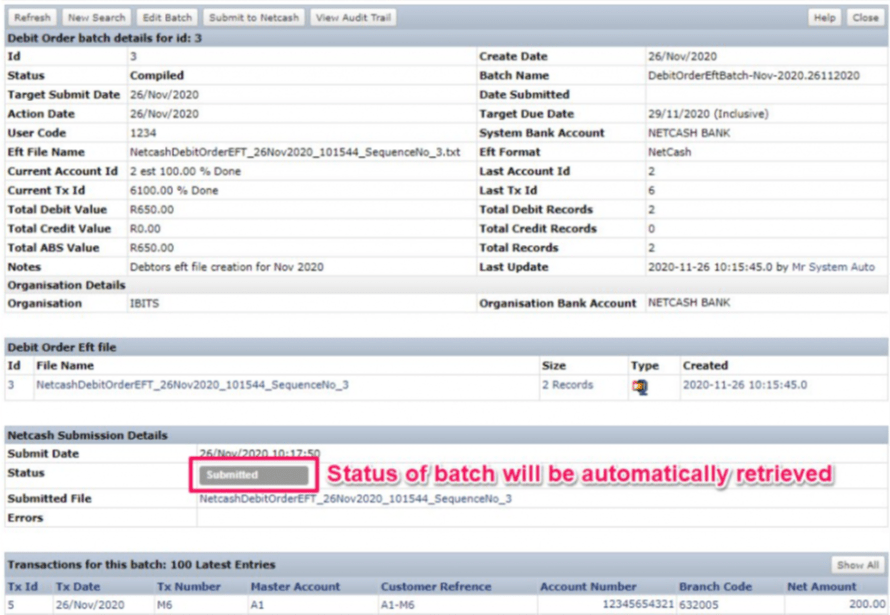
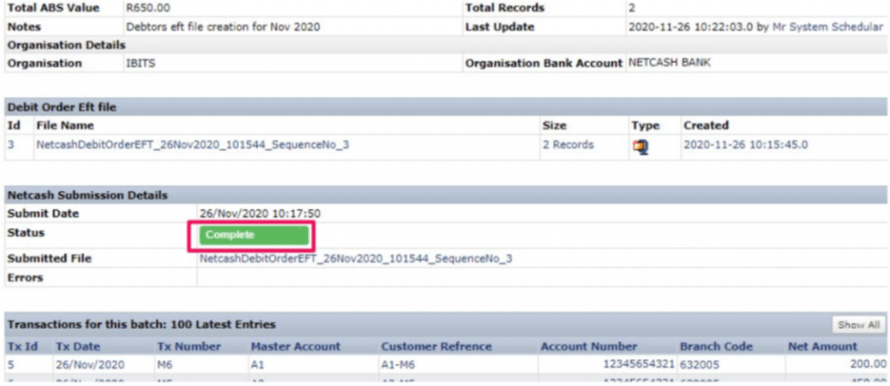
Once the batch submission status is showing “Completed”, the batch will appear on your Netcash account.
Navigate to Services> Debit Orders> Debit batches

Pay Now Integration
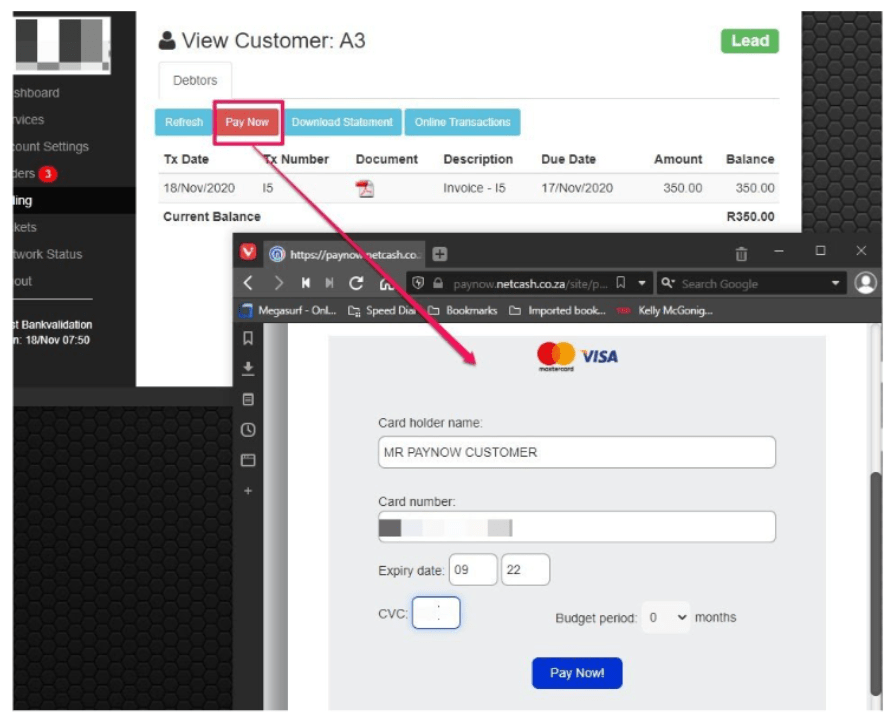
The Pay Now button relies on the “Pay Now” service key and is indirectly reliant on the “Account service” key for statement reconciliation. The Pay Now button is integrated into the SOLID customer self-service portal. Customers who are in arrears or choose to manually settle their accounts can conveniently make use of this facility to settle their outstanding balances.
Statement Processing and Reconciliation
Statement processing and reconciliation is really a sub-function of Debit Orders and Pay Now submissions. Netcash is modelled as a bank account in its own right in the SOLID system. A statement is pulled and processed daily using the “Account service” key. The receipts raised by the debit order batch creation process will be automatically matched to either settlement or rejection lines in the statement. In the case of rejections, the receipt raised when the batch was created will be reversed. All receipts raised via the Pay Now process will also be automatically matched.
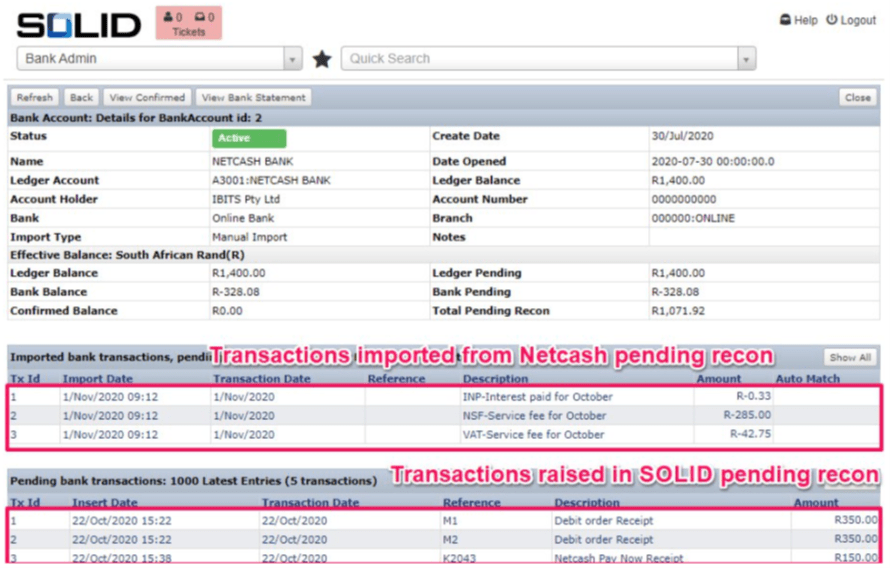
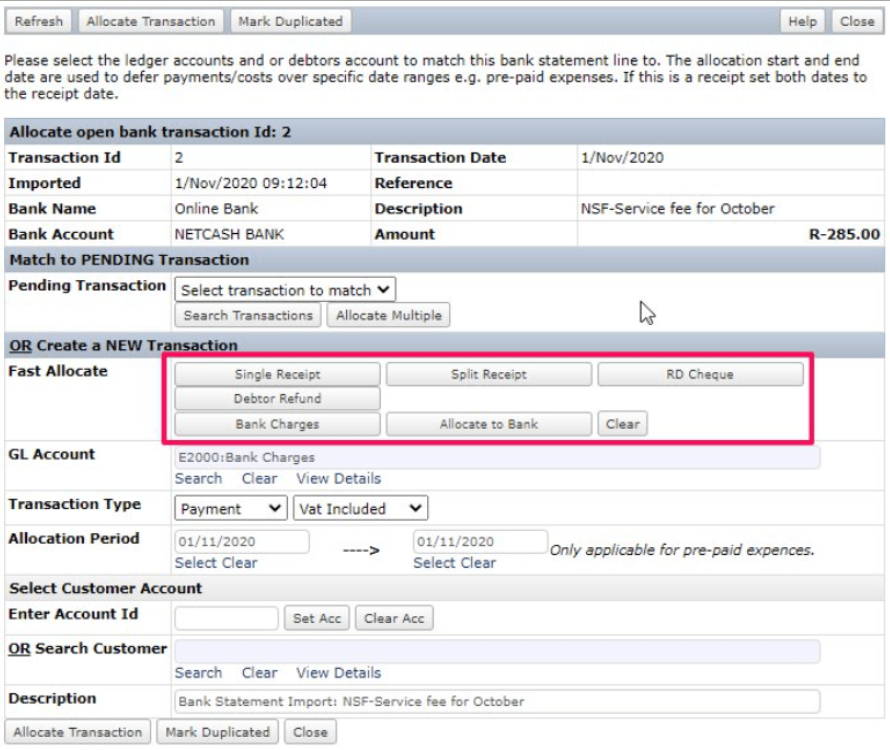
Any items from the Netcash statement that do not have entries on the SOLID system can manually be accounted for using the fast-allocate functions available in SOLID.
Credit Card Payment Detail Capture
To enable credit card payment detail capture, you first need to generate a PCI vault key. This is the key used to tokenize credit cards.
Netcash, navigate to Account Profile > PCI vault key> Click Generate new key
Copy the key
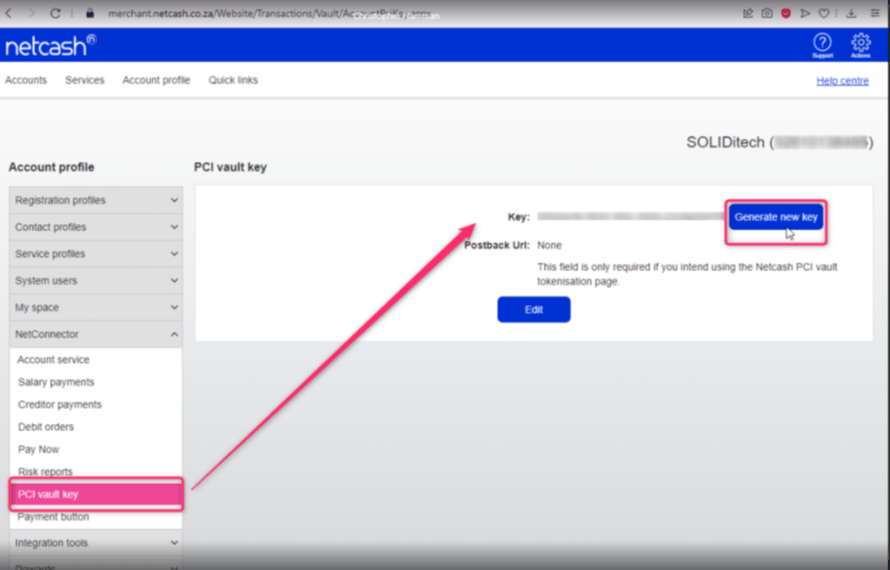
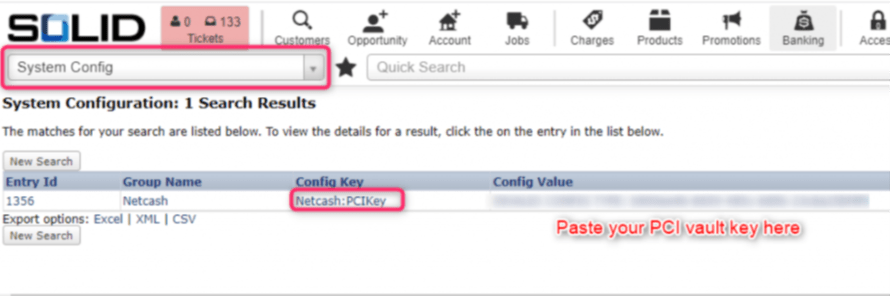
Once you’ve generated a key, go to the System Config module on SOLID Admin and configure these settings:
Netcash:PCIKey = “your PCI vault key”
Netcash:EnableCreditCardTokenization = y
CreditCardSettings:AllowOtherDataInCVVNumberFieldEnabled = y
CollectionSettings:IncludeCreditCardWithDebitOrderProcessingEnabled = y
Once enabled, customers will have the option to select Credit Card as a payment method, whether on the Customer portal
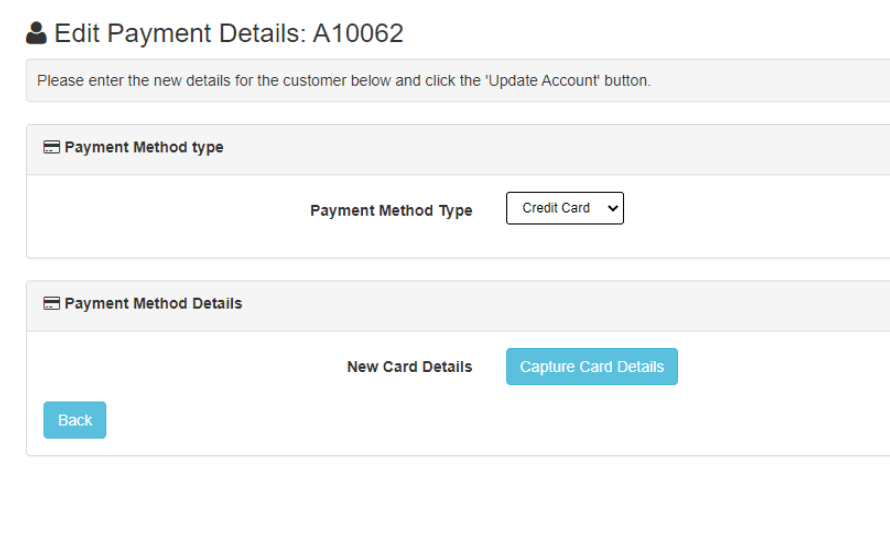
Or online sales: